Day2-SpringBoot自动配置
==1.父项目做依赖管理==
依赖管理
<parent>
        <groupId>org.springframework.boot</groupId>
        <artifactId>spring-boot-starter-parent</artifactId>
        <version>2.3.4.RELEASE</version>
</parent>

他的父项目
 <parent>
    <groupId>org.springframework.boot</groupId>
    <artifactId>spring-boot-dependencies</artifactId>
    <version>2.3.4.RELEASE</version>
  </parent>

几乎声明了所有开发中常用的依赖的版本号,自动版本仲裁机制
|
==2.开发导入starter场景启动器==
1、见到很多 spring-boot-starter-* : *就某种场景
2、只要引入starter,这个场景的所有常规需要的依赖我们都自动引入
3、SpringBoot所有支持的场景
https://docs.spring.io/spring-boot/docs/current/reference/html/using-spring-boot.html#using-boot-starter
4、见到的  *-spring-boot-starter: 第三方为我们提供的简化开发的场景启动器。
5、所有场景启动器最底层的依赖
<dependency>
  <groupId>org.springframework.boot</groupId>
  <artifactId>spring-boot-starter</artifactId>
  <version>2.3.4.RELEASE</version>
  <scope>compile</scope>
</dependency>
|
1、引入依赖默认都可以不写版本
2、引入非版本仲裁的jar,要写版本号。
1、查看spring-boot-dependencies里面规定当前依赖的版本 用的 key。
2、在当前项目里面重写配置
    <properties>
        <mysql.version>5.1.43</mysql.version>
    </properties>
|
==3.自动配置==
自动配好Tomcat
引入Tomcat依赖。
配置Tomcat
<dependency>
      <groupId>org.springframework.boot</groupId>
      <artifactId>spring-boot-starter-tomcat</artifactId>
      <version>2.3.4.RELEASE</version>
      <scope>compile</scope>
    </dependency>
|
自动配好SpringMVC
引入SpringMVC全套组件
自动配好SpringMVC常用组件(功能)
自动配好Web常见功能,如:字符编码问题
SpringBoot帮我们配置好了所有web开发的常见场景
默认的包结构
主程序所在包及其下面的所有子包里面的组件都会被默认扫描进来
无需以前的包扫描配置
想要改变扫描路径,@SpringBootApplication(scanBasePackages=“com.atguigu”)
或者@ComponentScan 指定扫描路径
主程序里的@SpringBootApplication注解等同于
@SpringBootConfiguration
@EnableAutoConfiguration
@ComponentScan(“com.atguigu.boot”) # 指定要扫描那个包下的 加入beans
各种配置拥有默认值
默认配置最终都是映射到某个类上,如:MultipartProperties
配置文件的值最终会绑定每个类上,这个类会在容器中创建对象
按需加载所有自动配置项
非常多的starter
引入了哪些场景这个场景的自动配置才会开启
SpringBoot所有的自动配置功能都在 spring-boot-autoconfigure 包里面
容器功能
==1.组件添加到SpringBoot容器中==
@Configuration
基本使用
Full模式与Lite模式
示例
最佳实战
- 配置 类组件之间无依赖关系用Lite模式加速容器启动过程,减少判断 @Configuration(proxyBeanMethods = false)
- 配置类组件之间有依赖关系,方法会被调用得到之前单实例组件,用Full模式 @Configuration(proxyBeanMethods = true)
@Bean、@Component、@Controller、@Service、@Repository
@ComponentScan、@Import
@Import({User.class, DBHelper.class}) * 给容器中自动创建出这两个类型的组件、默认组件的名字就是全类名
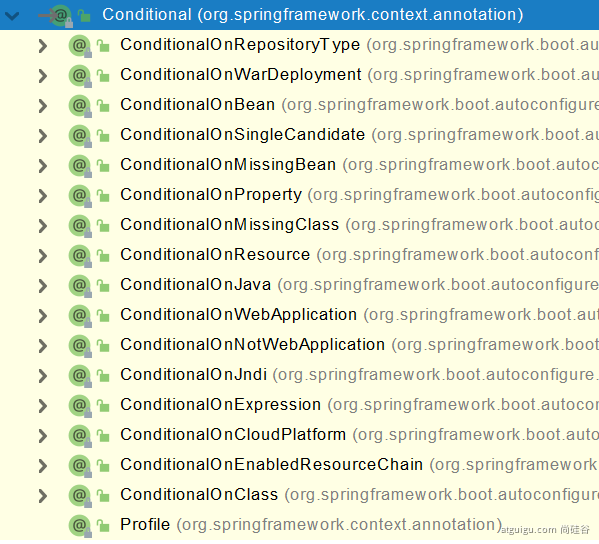
@Conditional
条件装配:满足Conditional指定的条件,则进行组件注入
==2.原生配置文件引入(承接SSM)==
@ImportResource
======================beans.xml=========================
<?xml version="1.0" encoding="UTF-8"?>
<beans xmlns="http://www.springframework.org/schema/beans"
       xmlns:xsi="http://www.w3.org/2001/XMLSchema-instance"
       xmlns:context="http://www.springframework.org/schema/context"
       xsi:schemaLocation="http://www.springframework.org/schema/beans http://www.springframework.org/schema/beans/spring-beans.xsd http://www.springframework.org/schema/context https://www.springframework.org/schema/context/spring-context.xsd">

    <bean id="haha" class="com.atguigu.boot.bean.User">
        <property name="name" value="zhangsan"></property>
        <property name="age" value="18"></property>
    </bean>

    <bean id="hehe" class="com.atguigu.boot.bean.Pet">
        <property name="name" value="tomcat"></property>
    </bean>
</beans>
|
@ImportResource("classpath:beans.xml")
public class MyConfig {}
======================测试=================
boolean haha = run.containsBean("haha");
boolean hehe = run.containsBean("hehe");
System.out.println("haha:"+haha);
System.out.println("hehe:"+hehe);
|
==3.配置绑定==
原生java读取属性配置文件
public class getProperties {
public static void main(String[] args) throws FileNotFoundException, IOException {
Properties pps = new Properties();
pps.load(new FileInputStream("a.properties"));
Enumeration enum1 = pps.propertyNames();
while(enum1.hasMoreElements()) {
String strKey = (String) enum1.nextElement();
String strValue = pps.getProperty(strKey);
System.out.println(strKey + "=" + strValue);
}
}
}
|
1.@ConfigurationProperties
@Component
@ConfigurationProperties(prefix = "mycar")
public class Car {
private String brand;
private Integer price;
public String getBrand() {
return brand;
}
public void setBrand(String brand) {
this.brand = brand;
}
public Integer getPrice() {
return price;
}
public void setPrice(Integer price) {
this.price = price;
}
@Override
public String toString() {
return "Car{" +
"brand='" + brand + '\'' +
", price=" + price +
'}';
}
}
|
2、@EnableConfigurationProperties + @ConfigurationProperties
3、@Component + @ConfigurationProperties
@EnableConfigurationProperties(Car.class)
|